


VNP Input Webservices - Multimedial Enrichments
Webservices - Multimedial Enrichments
automatically enrich a virtual newspaper page with multimedia contents as links, video etc.
The service allow to send a Json structured data containing the multimedia informations.
The Json must be posted to the address //webservice/v3/multimedia
together with some extra parameters:
- the authCode is an hashed string in md5 format resulting from the token value concatenated with the private key.
- the token value is an alphanumeric string decided by you
- the payload that contains the Json url-encoded
the private key is a private hashing string that you can find in the VNP backend -> settings -> key codes -> Private Ws Key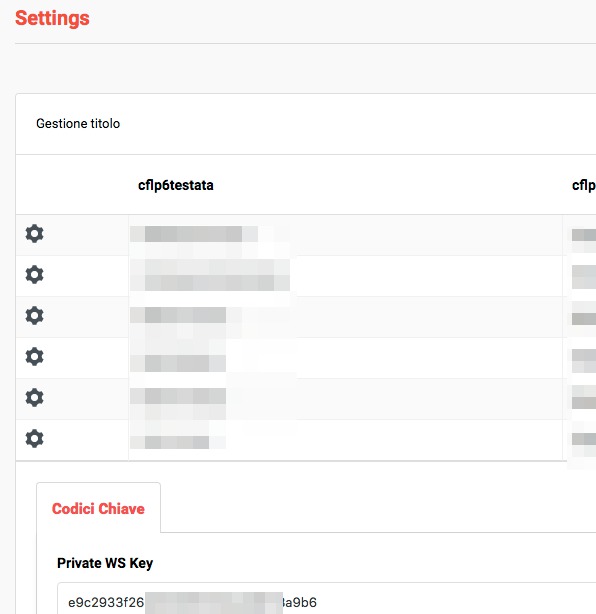
The authcode is generated concatenating the token string with the private key, without any space in between.
As first step, you have to decide a token, which should change at every request. Then get the Private WS Key, paste it together with the token, without spaces, and hash it in MD5. The result will be the value for the authCode.
The second step is to create the Json to be posted to the web service URL.
In the Json it's possible to specify three different multimedia "type"
- link : a link to an external URL/web site page that will open in a different tab
- video : a URL pointing to a video that will be embedded in the same page into an overlay window
- jump : a reference to another page also in a different edition
Here is an example of how the URL for the POST should be built:
webservice/v3/multimedia?authCode=your_authcode&token=your_token_string&payload=%7B%22title%22%3A+
%22TORINO%22%2C+%22issue%22%3A%222019-05-29%22%2C+%22data%22%3A+%5B+%7B++%22id%22%3A%229876%22%2C++
%22externalId%22%3A%22aabb%22%2C++%22tooltip%22%3A%22Go+somewhere%22%2C+%22caption%22%3A
%22test_link%22%2C+%22type%22%3A%22link%22%2C++%22data%22%3A++%7B+%22url%22%3A+%22https%3A%2F
%2Fwww.google.com%22%7D%2C++%22coordinates%22%3A+%7B+%22x%22%3A%221%22%2C++%22y%22%3A%221%22%2C+
%22w%22%3A%221%22%2C+%22h%22%3A%221%22++%7D+%7D+%5D%0D%0A%7D
Json strucutre
Below there are sample of Json to handle all three different types. Following is the description of the Json structure.
Te Json "data" item is processed and it will cause a record to be updated or inserted, depending if the provided id already exists or not.
The Json must contain the information to locate the page/edition where the link should be placed together with all multimedia's information and the coordinates for the in-page box (that can be null), like:
- title
- it's the title name (publication) of the issue where the multimedia should be placed in
- issue
- the date of your issue (edition)
- data - the container for the multimedia info
- id
- the unique identifier of the multimedia object (integer)
- page
- the page number where the link where the multimedia object will be placed
- externalId
- a code identifing the external object (optional, alphanumeric string)
- tooltip
- the tip that will be displayed on mouse over the multimedia object link (optional)
- caption
- The caption used to display the link (mandatory)
- type
- the link type to build
- link - when the link is pointing to a third party page, like a page on wikipedia or an article on a different web site. The page will be opened in another tab.
- jump - when the link is pointing to another page of your edition. It can be a page in a different edition.
The jump requires the attributes "title", "issue" and "to" to be specified inside the data link (see samples below). They represent the publication name (title), the publication date (issue) and the page you want to refer to (to). - video - when the link is pointing to a video URL. The video will be opened into a pop-up window.
- the link type to build
- coordinates
- the x, y, w, and h coordinates to display the in-page box. If all set to 0 "zero" the link will not appear onto the page but only in the multimedia pop-up windows that appears pressing the icon on the page bottom.
- data - another data container that holds the link info.
This node can contain the following group of information:- link case:
url - the third party URL - jump case
a group containing
- title : the title of the issue
- issue : the publication date of the issue
- to : the page number - video case:
- url : the URL for the file on your platform
- link case:
- id
Here are some samples
LINK
{"title":"THEDAILY",
 "issue":"2019-05-29",
 "data":
  [
    {
       "id":"1243",
       "page":"5",
       "externalId":"3371",
       "tooltip":"Click to read the doc",
       "caption":"Webservices - Multimedial Enrichments",
       "type":"link",
       "data":
         {
            "url": "https://www.virtualacademy.it/news/webservices/3371/webservices---multimedial-enrichments.html?paywall_canRead=true"
         },
       "coordinates":
         {
            "x":"1",
            "y":"1",
            "w":"1",
            "h":"1"
         }
     }
   ]
}
JUMP
{"title":"THEDAILY",
 "issue":"2019-05-29",
 "data":
  [
    {
       "id":"1578",
       "page":"10",
       "externalId":"415765",
       "tooltip":"View the last week article",
       "caption":"The bus crash in Carnaby street",
       "type":"jump",
       "data":
         {
            "title": "THEDAILY",
            "issue": "2019-05-22",
            "to": "6"
         },
       "coordinates":
         {
            "x":"1",
            "y":"1",
            "w":"1",
            "h":"1"
          }
     }
   ]
}
VIDEO
{"title":"THEDAILY",
 "issue":"2019-05-29",
 "data":
  [
    {
       "id":"1876",
       "page":"22",
       "externalId":"CAgP9fo3f7s",
       "tooltip":"View the video",
       "caption":"Again wildfire in Yellowstone",
       "type":"video",
       "data":
          {
             "url": "https://www.youtube.com/watch?v=CAgP9fo3f7s"
          },
        "coordinates":
          {
             "x":"1",
             "y":"1",
             "w":"1",
             "h":"1"
          }
    }
  ]
}
| PARAMETER NAME | MANDATORY | VALUE FORMAT | DESCRIPTION | EXAMPLE |
|---|---|---|---|---|
| authCode | Y | string | must contain token+private_key_WS (available on the "Settings" panel of your VirtualNewspaper Back-end). The authCode needs to be provided in md5 format. | |
| token | Y | string | contains a value decided by you, i.e. timestamp | |
| payload | Y | string | see above description |

22/06/2016
21/10/2019