


How to use AMP.
What they are, how to create and customize them.
The Accelerated Mobile Pages Project (AMP) is an open-source initiative to improve the performance of web contents and ads through a publishing technology known as AMP.
It is a project launched by Google, specifically targeted at news sites and blogs to facilitate the loading speed of mobile pages.
An AMP version page is a HTML, CSS and Javascript-based page(like the others), but it has restrictions based on rules and specific tags that, by eliminating many elements that "slow down" the site, allows a marked reduction of page weight and loading time.
Why use AMP?
In addition to the explicit advantages in terms of speed of loading, which also correspond to a better ranking in terms of research, it seems that Google has an extra eye on this type of pages by giving them more weight and better SEO ranking.
Learn more here

2. Customize the style
To customize the generic style of the Amp article and style generic classes, you need to go from Layout Editor to Editor > Structure CSS > Style Amp and enter the desired style.
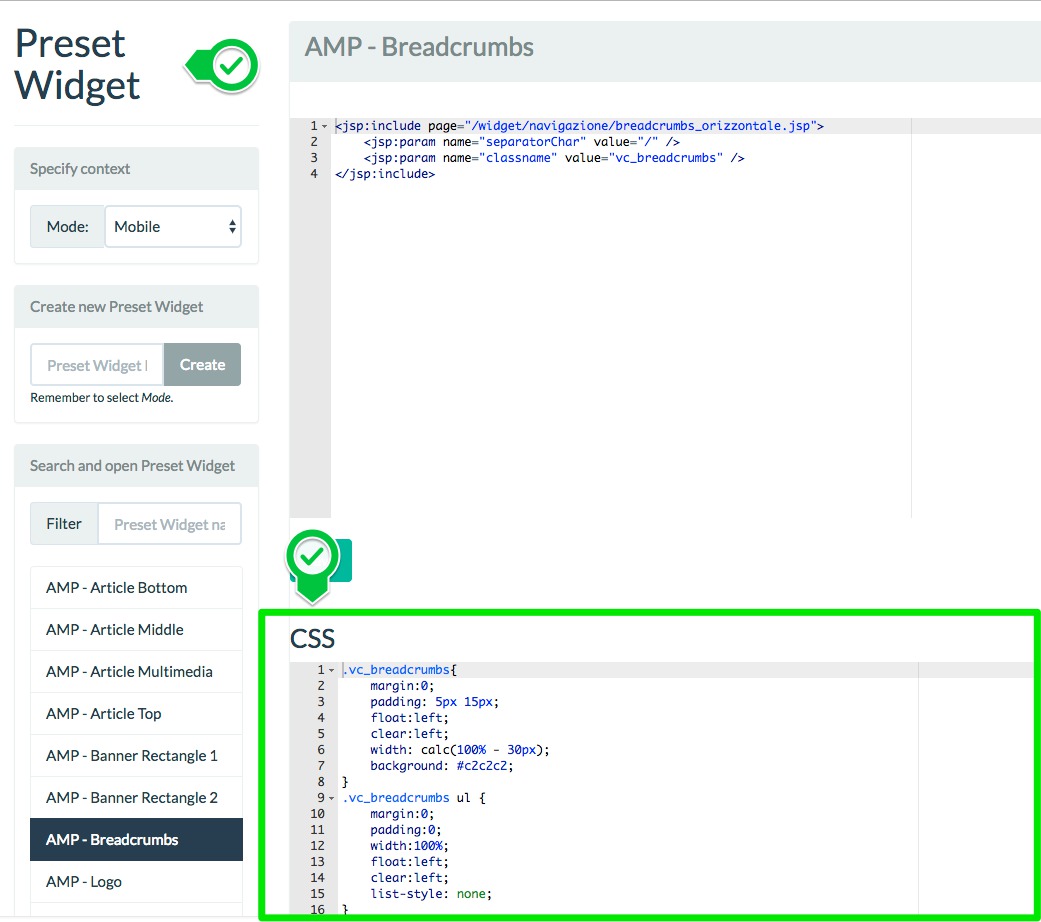
Instead, to customize the style of the widgets, the procedure is the same as classic widgets: just go into the preset widget and enter the style in the CSS part.
To have a preview of article's AMP layout, simply open any content, set the mobile view and then:
- if the article link ends with .html replace it with .amp
- if the article link doesn't end with .html add to the link /amp

25/10/2017
10/08/2018