

VNP Input Webservices - Login/User Authentication
WS: Login.jsp
This VirtualNewspaper webservice is engineered to authenticate incoming users, collecting user account infos posted by an external platform, website or service.
When an user try to login, VirtualNewspaper checks if the user account already exists within its own internal database. If user account is not found, VirtualNewspaper makes a new call to a similar login webservice provided by the external platform, asking to validate the user account. If the user account is valid on the external platform, this last one will need to send back to VirtualNewspaper a JSON reply, allowing VirtualNewspaper to eventually collect and store missing infos; otherwise login will be refused.
This webservice will grant or deny access to VirtualNewspaper. VirtualNewspaper will grant access only if an user account is valid and available on the external platform.
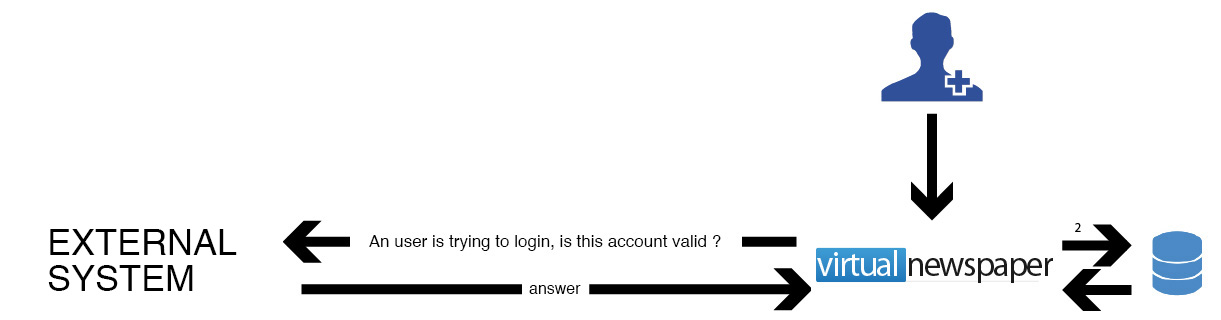
How to invoke this webservice
VirtualNewspaper informs an external platform about a missing user account while this user try to login. VirtualNewpaper will submit user account infos to the external platform.
Warning:
This POST call needs to be url encoded
Webservice Mandatory Parameters
VirtualNewspaper will submit to the external platform only "email" and "password".
Example
Parameters are transmitted using this syntax:
?username=mariorossi%40gmail.com&password=fr34df56
A new webservice call is needed for each user account.
Parameters and their values, need to be separated by the "equal to" char ("=").
After each parameter/value an "&" char is required.
Webservice reply
This External Platform Webservice must be able to provide two different replies :
01) User account is already available on the External Platform database.
Access is granted and a JSON reply reports current user informations.
In this scenario the External Platform JSON reply will look like this :
Fields login and id are mandatory
{
 “login” : “1”,
 “id” : “1502”,
 “companyTown” : “...”,
 “companyZip” : “...”,
 “companyAddress” : “...”,
 “company” : “...”,
 “gender” : “...”,
 “brithPlace” : “...”,
 “born” : “...”,
 “email” : “...”,
 “custom3” : “...”,
 “custom2” : “...”,
 “custom1” : “...”,
 “administrative_area_level_1” : “...”,
 “administrative_area_level_2” : “...”,
 “administrative_area_level_3” : “...”,
 “formatted_address” : “...”,
 “lat” : “...”,
 “lng” : “...”,
 “administrative_area_level_1_company” : “...”,
 “administrative_area_level_2_company” : “...”,
 “administrative_area_level_3_company” : “...”,
 “formatted_address_company” : “...”,
 “companyLat” : “...”,
 “companyLng” : “...”,
 “income” : “...”,
 “mobile” : “...”,
 “category” : “...”,
 “type” : “...”,
 “code” : “...”,
 “job” : “...”,
 “password” : “...”,
 “dateJoin” : “...”,
 “username” : “...”,
 “fax” : “...”,
 “newsletter” : “...”,
 “telephone” : “...”,
 “nation” : “...”,
 “city” : “...”,
 “zip” : “...”,
 “town” : “...”,
 “address” : “...”,
 “taxCode” : “...”,
 “companyVAT” : “...”,
 “companyTaxCode” : “...”,
 “companyFax” : “...”,
 “companyTelephone” : “...”,
 “companyNation” : “...”,
 “companyCity” : “...”,
 “custom4” : “...”,
 “custom5” : “...”,
 “custom6” : “...”,
 “custom7” : “...”,
 “custom8” : “...”,
 “custom9” : “...”,
 “custom10” : “...”,
 “citycode” : “...”,
 “citycode_company” : “...”
}
02) User account is not available on External Platform database.
Access denied.
In this scenario the External Platform JSON reply will look like this :
{
 “login” : “0”
}
PARAMETERS REFERENCE TABLE
| PARAMETER NAME | VALUE FORMAT | DESCRIPTION | EXAMPLE |
|---|---|---|---|
| username | string | it's the username as typed by end user | |
| password | string | it's the password as typed by end user |

21/12/2015
16/10/2018