

VNP Input Webservices - Users
WS Input Register User
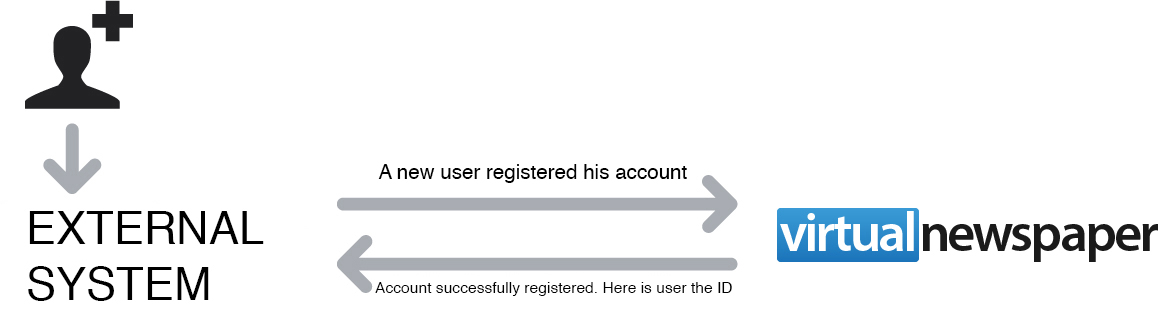
"wsRegisterUser.jsp" is a VirtualNewspaper input web ervice allowing to collect and store any user account created on an external platform. VirtualNewspaper replies providing transaction details and eventually reporting internal ID of the newly created user account. This web service allows VirtualNewspaper to create and store user infos within its own internal database.
How to invoke this webservice
Any external system informs VirtualNewspaper about a newly registered user account, providing all the collected user fields.
Warning:
This POST call needs to be url encoded
Webservice url
http://[wwx].virtualnewspaper.it/editor_or_title_name/webservice/wsRegisterUser.jsp+parameters
Webservice Mandatory Parameters
Mandatory parameters are : email, password and authCode
Password can be provided as plain text or as an md5 hash; if you choose md5, you will need to provide an additional "encryptedPassword" parameter presenting a "true" value. (Example : &encryptedPassword=true)
Example
Parameters need to be provided using this syntax:
?version=2&email=mariorossi%40gmail.com&password=fr34df56&authCode=1a2b3c4d5k34725t
A different call is required for each user you need to synchronize.
Parameters and their values, need to be separated by the "equal to" char ("=").
After each parameter/value an "&" char is required.
Warning:
You need to provide all parameters you want to synchronize.
Any missing or empty parameter will be stored using a "default value".
Webservice reply
This VirtualNewspaper webservice is able to provide two different replies :
01) User account has been succesfully created, this is VirtualNewspaper internal user ID.
In this scenario, a JSON response will look like:
{
 "user": {
 internalId: “88261”
 email: “customer@email.com”
 }
 “status”:”OK”
 “request”:“Request parameters”

}
Please link provided VirtualNewspaper internal user ID, with user data fields stored at your end.
02) Something went wrong.
In this scenario VirtualNewspaper JSON reply will look like this :
{
 “status”:“KO”,
 “error”:“Error message”
 “request”:“Request parameters”
}
PARAMETERS REFERENCE TABLE
| PARAMETER NAME | MANDATORY | VALUE FORMAT | DESCRIPTION | EXAMPLE |
|---|---|---|---|---|
| version | Y | string |
if version = 1 customerID, email, password and authCode are mandatory if version = 2 email, password and authCode are mandatory if version = 3 email and authCode are mandatory |
2 |
| Y | varchar(255) | |||
| password | Y | mediumtext | ||
| authCode | Y | string |
If the version = 1 the authCode must be the md5 of customerId + securityCode If the version = 2 or version = 3 the authCode must be the md5 of email + securityCode The securityCode is available on the "Settings" pane of your VirtualNewspaper Back-end. The authcode needs to be provided using md5. Example: for version = 2/3 : md5( pippo@pluto.com7e0a3dc105510f668f99f3516e41bde2 ) --> 22399e344e91355d775a5ff6a12ed79b |
|
| administrative_area_level_1 | N | varchar(200) | ||
| administrative_area_level_2 | N | varchar(200) | ||
| administrative_area_level_3 | N | varchar(200) | ||
| latitude | N | varchar(50) | ||
| longitude | N | varchar(50) | ||
| zip | N | string | postal code | 20156 |
| town | N | mediumtext | Milano | |
| city | N | mediumtext | Administrative area | Lombardia |
| address | N | mediumtext | ||
| nation | N | mediumtext | ||
| category | N | varchar(255) | ||
| telephone | N | varchar(50) | telephone number | +390216242128 |
| mobile | N | varchar(50) | mobile phone number | +393391621284 |
| surname | N | mediumtext | ||
| name | N | mediumtext | ||
| born | N | date | ||
| taxCode | N | string | "codice fiscale" | |
| dateJoin | N | date | customer's registration date | |
| vat | N | string | ||
| work | N | string | ||
| company | N | string | ||
| zip_company | N | string | ||
| city_company | N | varchar(255) | Lombardia | |
| nation_company | N | varchar(255) | Italia | |
| town_company | N | varchar(255) | Milano | |
| address_company | N | varchar(255) | ||
| telephone_company | N | varchar(255) | ||
| fax_company | N | varchar(255) | ||
| gender | N | varchar(30) | ||
| custom1 | N | varchar(300) | ||
| custom2 | N | varchar(300) | ||
| custom3 | N | varchar(300) | ||
| custom4 | N | varchar(300) | ||
| custom5 | N | varchar(300) | ||
| custom6 | N | varchar(300) | ||
| custom7 | N | varchar(300) | ||
| custom8 | N | varchar(300) | ||
| custom9 | N | varchar(300) | ||
| custom10 | N | varchar(300) | ||
| customerId | N | varchar(100) | it's the id used in the external system | |
| encryptedPassword | N | String | If "true", password is encrypted using MD5 otherwise password will be transmitted as plain text. |

12/11/2015
16/11/2023